Material on this page draws on the ProducepakQI app guide, the Producepak app guide, the Pak-Bot guide and Producepak and Farmsoft quality control pages listed under Resources below.
Why stand-alone QC apps fall short
Many produce businesses have tried a stand-alone quality app: a digital form that replaces paper, with photos and a report. It is an improvement, but the results stay in a silo. The packing manager still has to be told about a failed receival. The buyer still has to work out which supplier the failure relates to. Accounts still have to be told to adjust a grower payment or raise a claim. The traceability system still does not know which lots were affected. Quality data that does not flow into the rest of the business only solves part of the problem.
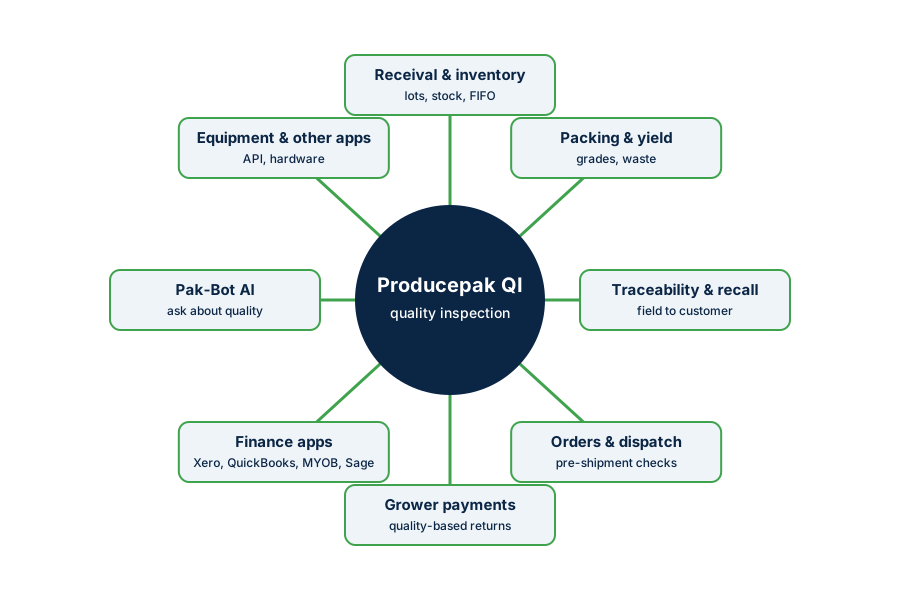
Producepak takes the opposite approach. Producepak Quality Inspection integrates with all other Producepak modules, your finance app and other apps in your business. A quality result becomes part of the inventory record, the packing plan, the traceability chain, the supplier history, the grower payment and the financial accounts.
Quality and inventory
Receival inspections decide what enters stock and in what condition. In Producepak, inspections relate to the deliveries and lots they cover, so quality status sits beside quantity and location. Producepak's inventory features include first-in, first-out tracking, barcode scanning, stocktakes, multi-site warehouses and automatic auditing. When quality and inventory share a record:
- product that inspected as borderline can be prioritised for early sale;
- failed lots can be held so they are not picked by mistake;
- stock reports can show quality alongside quantity.
Quality and packing
Pre-pack and post-pack inspections connect directly to packing and production, which the Producepak app guide describes as covering batch scheduling, raw material reverse calculation, waste tracking and automatic label generation. Quality results inform which product goes into which program, help explain packout differences, and catch grading problems early in a run. Pak-Bot can answer questions about yield, so a packing manager can compare quality and packout without exporting data.
Quality and traceability
Farmsoft's traceability material describes tracking product quality at every stage of the supply chain, from the farm to the consumer, and managing recall, mock recall, audits and QC in one platform. Incoming deliveries are captured by barcode scanning, and unique QR codes can be generated for products. The ProducepakQI guide describes tracing customer complaints back to the supplier or to the original crop, field or patch, and instant recalls.
Integration matters here because a recall is a quality event and a traceability event at once. When a problem is found, the business needs to know which lots are affected, where they went and what their inspection history shows, all at the same time.
Quality and orders and dispatch
Pre-shipment inspections connect quality to customer orders. The Producepak app guide lists customer orders, guided pick slips, automatic bills of lading and invoices, and real-time dispatch monitoring. When a pre-shipment check fails, the order can be adjusted before the truck leaves, and the customer informed. When a customer later raises a complaint, the pre-shipment record for that order is already linked.
Quality and grower payments
For packers and marketers paying growers on packed-out or graded product, quality inspections drive returns. Producepak's grower payment processing uses the same records: received weights, grades, packout and sales. When quality is integrated, grading decisions, photos and payments line up, and growers can see why their fruit was paid as it was. Producepak reports a 90 percent reduction in grower payment administration costs.
Quality and your finance app
Quality affects money directly: claims against suppliers, credits to customers, regrades that change value, write-offs for waste. Producepak connects to finance apps including Xero, QuickBooks, MYOB, Sage and SaasAnt, according to the Producepak app guide, and the ProducepakQI guide describes integration with finance and hardware. When quality-driven adjustments flow through the same system that produces invoices, the financial effect of quality is captured rather than lost in emails.
| Quality event | Financial effect | Where it lands |
|---|---|---|
| Supplier load downgraded | Lower purchase price or claim | Supplier account and grower payment |
| Customer rejection | Credit note | Customer invoice in the finance app |
| Product written off | Inventory write-down | Inventory and accounts |
| Regrade to a lower program | Lower sale value | Sales and margin reporting |
Quality and other apps
Not every business runs everything in Producepak. The ProducepakQI guide states that it can integrate with other apps, finance and equipment, and that API integration is available for custom features. Examples include equipment that produces measurements, business intelligence tools such as Microsoft BI, which the Producepak app guide lists under analytics, and customer or supplier portals. Discuss specific integrations with Producepak during a demo.
Quality and Pak-Bot
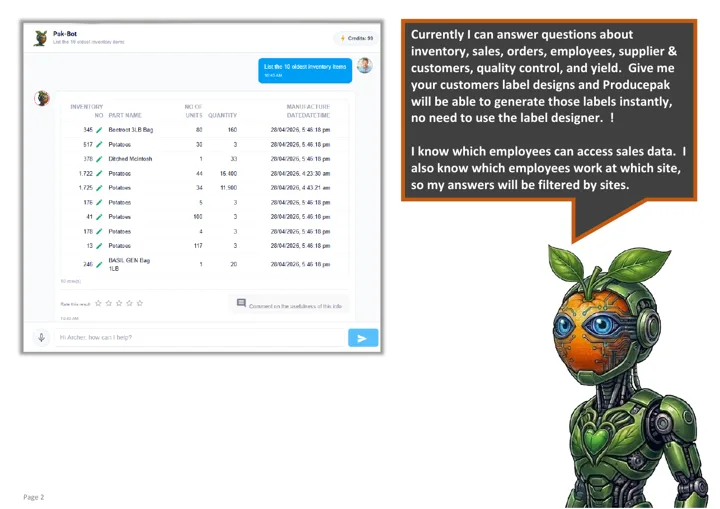
Pak-Bot, the AI chatbot inside Producepak, lists quality control and yield among the subjects it answers questions about, alongside inventory, sales, orders, employees, suppliers and customers. Because Pak-Bot reads the integrated Producepak data, it can answer questions that cross departments, for example comparing a supplier's rejection rate with the packout of their product. Pak-Bot knows which employees can see which data and which site they work at, and its guide states that your data, excluding prompts, stays on Producepak servers rather than being sent to ChatGPT.
Quality labels and documents
The ProducepakQI guide lists QC dashboards and QC labels, with user-designed labels printed directly from the app. Quality status can therefore appear on physical product as well as in the system, for example a hold label on a failed pallet, so that people on the floor see the decision without checking a screen.
An integrated quality day
- A delivery arrives; the receival inspection shows decay above the limit.
- An alert with photos goes to the buyer and the supplier.
- The lot is held in inventory and a hold label is printed.
- The supplier agrees a downgrade; the purchase value is adjusted.
- The lot is routed to a lower program; packout is tracked.
- The grower payment reflects the agreed grade.
- At month end, Pak-Bot answers "rejected loads by supplier this month" for the supplier review.
Every step uses the same record. Nothing is retyped and nothing is lost between departments.
Integration checklist
When planning an integrated quality program, work through these questions with your team and with Producepak.
- Which deliveries and lots should every inspection link to?
- Which inspection results should place stock on hold automatically or by procedure?
- Who should receive alerts for each program, inside and outside the business?
- How should downgrades and claims be reflected in supplier accounts and grower payments?
- Which finance app do you use, and which quality-driven transactions should reach it?
- Do any instruments or equipment produce measurements that could feed inspections?
- Which reports and dashboards do managers need, and which questions will they ask Pak-Bot?
Benefits of a single quality record
One version of the truth
QA, buying, packing, sales and accounts all see the same result for the same lot.
Faster decisions
Holds, regrades and claims start from the inspection, not from an email chain.
Complete traceability
Quality history travels with the lot from receival to customer.
Accurate finances
The cost of quality is captured in supplier accounts, grower payments and customer credits.
Integration for multi-site businesses
For businesses with several packhouses, cool stores or warehouses, integration also means consistency across locations. The Producepak app guide lists multi-site warehouses among its inventory features. Running the same inspection programs at each site, feeding the same supplier history and the same finance app, lets management compare sites fairly and see the total cost of quality for the business, not just for one shed.
Starting small, integrating fully
Integration does not have to happen all at once. A practical sequence is to start with receival inspections linked to inventory, then add alerts to buyers and suppliers, then post-pack and pre-shipment programs, then the link to grower payments and the finance app. Each step adds value on its own, and each makes the next one easier. By the end of a season, quality data should be flowing to every part of the business that depends on it.
What integration looks like for different businesses
| Business type | Most valuable integration |
|---|---|
| Packer working on grower consignment | Quality results flowing into grading, packout and grower payments |
| Wholesaler or distributor | Receival quality linked to supplier claims and to stock rotation |
| Retail program supplier | Pre-shipment checks against each retailer's specification, linked to orders |
| Fresh-cut processor | Raw material quality linked to production yield and traceability |
| Importer or exporter | Arrival inspections linked to claims against shippers and to sales decisions |
Security in an integrated system
When quality data flows across the business, access needs to be controlled. Inspection results can reveal commercially sensitive information about suppliers and customers. Producepak applies user roles across its modules, and Pak-Bot knows which employees can access which data and which site each employee works at. Plan who should see supplier quality comparisons, who should receive alerts, and who can approve downgrades and claims, and set roles accordingly.
From quality department to quality business
The real goal of integration is cultural as much as technical. When quality results appear in the inventory screen, the packing plan, the supplier account and the monthly accounts, quality stops being the QA team's problem and becomes everyone's information. Buyers think about quality when choosing suppliers, packing managers think about it when planning runs, sales think about it when promising product, and owners see its effect on margin. That shared view is what turns a good QC program into consistently good product.
Working with Producepak on integration
Every business has a different mix of systems. During a demo, describe your current finance app, any instruments used in the QC lab or on the line, and any customer or supplier portals you use. Producepak can explain which connections are standard, such as the finance apps listed in its app guide, and which would use API integration for custom features.
Integrated QC questions
Does Producepak Quality Inspection integrate with other modules?
Yes. It integrates with all other Producepak modules, including inventory, packing, traceability, orders and grower payments.
Which finance apps are supported?
The Producepak app guide lists Xero, QuickBooks, MYOB, Sage and SaasAnt.
Can it connect to equipment and other apps?
The ProducepakQI guide describes integration with other apps, finance and equipment, with API integration available for custom features.
Can Pak-Bot answer quality questions?
Yes. Pak-Bot answers questions about quality control and yield, using integrated Producepak data and each user's permissions.