Why "how to use AI" is the right question
Most produce businesses no longer ask whether AI is real or useful. They have seen chatbots write emails and summarise documents. The question now is practical: how do we actually use AI in a fresh produce business, on a busy Tuesday, with the people and data we already have? This guide answers that question in six short steps, using Pak-Bot, the AI chatbot built into Producepak.
The guide assumes no technical background. If you can send a text message, you can use Pak-Bot. What makes the difference between occasional use and everyday value is knowing what to ask, how to check the answer and what to do with it next. That is what the following pages teach.
Each page ends with links to the next step, and each has a copy of the relevant page from the three-page Pak-Bot PDF guide. Download the PDF once and keep it nearby; it is a handy one-glance summary for the whole team.
The five-step method
Every productive use of Pak-Bot follows the same five steps, whether the question is about stock in a cool room or sales to a supermarket chain.
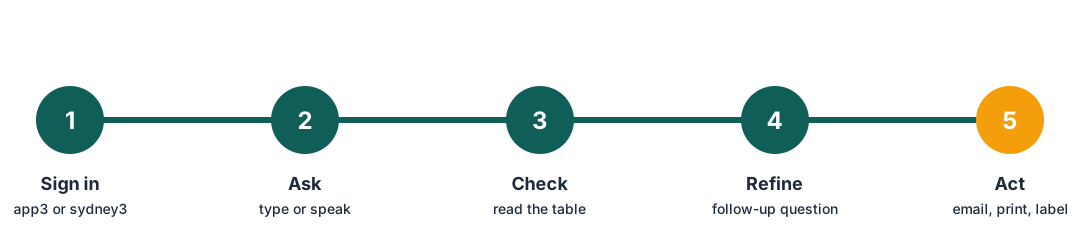
Step 1: sign in
Pak-Bot lives inside the new Producepak app, so there is no separate login. Open the address for your region:
| Region | Address |
|---|---|
| USA, Europe, Africa | app3.producepak.com |
| Australia, New Zealand, Asia | sydney3.producepak.com |
The app can be installed on Android and Windows using "Install app". The installed version does not allow several tabs at once, so if you like to keep orders, stock and Pak-Bot open side by side, use the browser instead. Full setup advice is on the set up safely page.
Step 2: ask
Type a question in the message box, or press the microphone button and say it. Write the way you would ask a capable colleague. Pak-Bot's own introduction sets the tone: "Ask me anything! I use generative A.I. reporting to answer any question you can think of, the only limit is your imagination."
Try one of these first
- Total sales last month
- Total yellow potato in stock
- List the 10 oldest inventory items
Pick a question you already roughly know the answer to. That way you can judge the result straight away and build confidence in the tool. The next page, how to ask, explains the wording that works best.
Step 3: check
Pak-Bot replies with a figure, a table or a chart. Charts always come with the table of values underneath, and tables show how many rows were returned. Read it as you would read any report: do the products, customers and dates look right? Is the total in the range you expected?
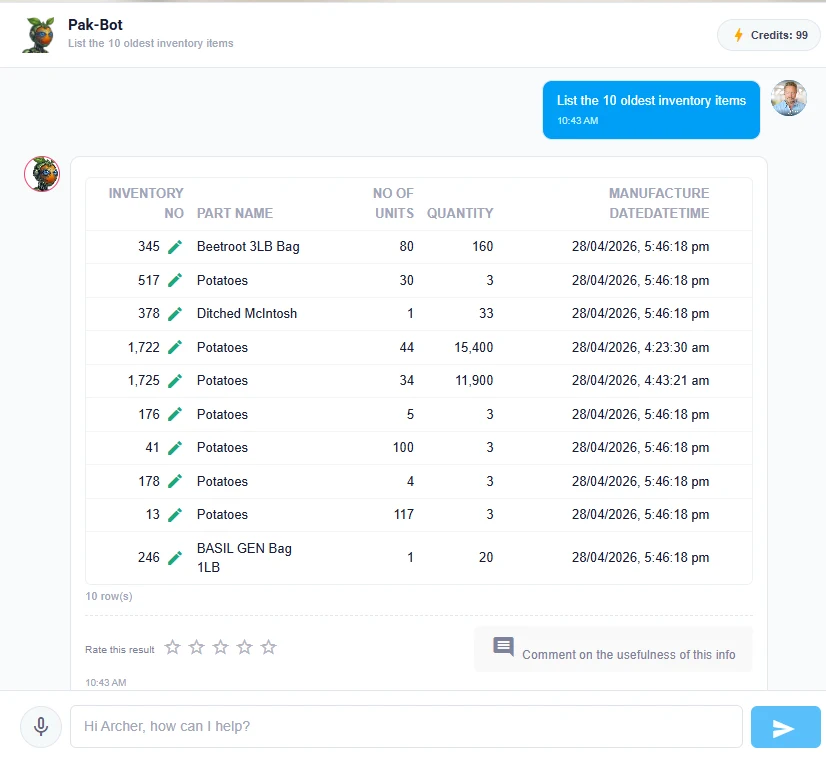
If something looks wrong, the cause is usually a name or a date range that Pak-Bot read differently from how you meant it. Step 4 fixes that.
Step 4: refine
Most useful AI sessions are conversations, not single questions. After the first answer, narrow it, regroup it or change its form:
- "Only site Closters."
- "By customer."
- "Show that as a bar chart."
- "Same thing for last year."
If the first answer was wrong rather than incomplete, rephrase with the exact name used in Producepak, such as the full customer name or the product name as it appears on your product list, and an explicit period.
Step 5: act
An answer is only valuable when it changes what someone does. Pak-Bot can carry the answer to where it is needed. It can email and print documents, labels and ad hoc reports. Email Angela Coles sales from Q1 sends the result in one request. A printed list of the oldest stock goes to the forklift driver. Customer labels can be produced from templates. The reports and email page shows each action step by step.
Finally, rate the answer. Every reply has five stars and a comment box. Pak-Bot says it is still learning and that the team uses feedback to train it, so a rating takes two seconds and makes the next answer better for everyone.
What you can use Pak-Bot for today
According to the Pak-Bot guide, Pak-Bot currently answers questions about inventory, sales, orders, employees, suppliers and customers, quality control and yield. On top of answering, it can:
- draw charts and tables from a single request;
- email and print documents, reports and labels;
- generate a customer's labels instantly once that customer's label design has been loaded, without opening the label designer;
- turn customer documents into orders, covered on the orders and labels page.
| Area | Example from the Pak-Bot guide |
|---|---|
| Sales by person | Email Angela Coles sales from Q1 |
| Sales by customer and product | Woolworths sales of baby spinach this year |
| Sales totals | Total sales last month |
| Sales by region | Sales by state last month |
| Stock by product | Total yellow potato in stock |
| Stock by container | Weight of totes in stock |
| Stock by owner | Totals of inventory owned by ACE Farming Group |
| Stock by site | Total of inventory at site Closters |
| Orders against sales | Walmart orders vs sales Q1 2026 |
| Stock by pack format | Red onion in poly bags |
Who should use it
The short answer is anyone in the business who regularly asks someone else for a number. In most produce businesses that includes owners and managers, sales and account staff, warehouse and cool room supervisors, packing managers, quality staff, office and order-entry staff, and whoever looks after growers. The use cases by role page gives each of them a starting routine.
Pak-Bot respects each person's access. It knows which employees can see sales data and which site each employee works at, and filters answers accordingly. You can give it to the whole team without opening sensitive information to everyone.
What to expect in the first week
Teams that start well usually see a pattern. On the first day, people test it with questions they know the answer to, and are surprised how quickly the answer comes back. By the third day they are asking follow-ups and charts. By the end of the week, the requests that used to go to the office ("can you pull the numbers for...") start to fall, because people get the numbers themselves.
You will also find a few questions Pak-Bot misreads, usually because of a nickname or an unusual product name. Treat these as useful: comment on them, rephrase, and note the wording that works. Those notes become your team's prompt list.
Five habits of teams that use AI well
- They ask small questions often. A two-second question each morning beats a long report once a month.
- They always check the table. Charts are quick to read; tables confirm the detail.
- They use real names. Customer, product, site and grower names as they appear in Producepak.
- They act on answers. Email it, print it, move the pallet, call the grower.
- They rate everything. Feedback is how Pak-Bot learns the business's language.
Where your data goes
The Pak-Bot guide is clear that your data, excluding the prompts themselves, is not sent to ChatGPT and always stays on Producepak servers. The AI model interprets the sentence you type; the numbers come from your Producepak records. Because the wording of prompts is used for interpretation, keep passwords, bank details and confidential contract text out of your questions. A good question never needs them. More on this in set up safely.
If you are moving from Farmsoft
Existing Farmsoft users can keep using Farmsoft until 2028. Pak-Bot is part of the newer Producepak app, so using it means signing in to Producepak. Many businesses start by giving Pak-Bot to a small group of users in Producepak while the wider move is planned, which lets the team learn how to use AI before the full changeover.
A worked example: one morning with AI
To make the method concrete, here is an illustrative morning at a mid-sized vegetable packer that has started using Pak-Bot.
05:30, dispatch
The dispatch lead asks Red onion in poly bags. The total is below what today's orders need, so she alerts the packing manager before the trucks arrive rather than after.
06:15, packing
The packing manager asks Weight of totes in stock, then "red onion in bins". There is enough raw stock, so an extra poly-bag run goes first on line 2.
08:00, sales
A customer rings asking for yellow potatoes. The sales rep asks Total yellow potato in stock and quotes from the live figure instead of guessing.
10:00, cool room
The supervisor asks List the 10 oldest inventory items, checks the table and asks Pak-Bot to print it. The forklift driver moves those pallets to the front for the afternoon picks.
11:30, management
The general manager asks Walmart orders vs sales Q1 2026 ahead of a supplier review, refines it by product, and emails the result to the sales manager.
None of these people waited for a report or interrupted the office. Each followed the same five steps: sign in, ask, check, refine, act.
How to tell whether AI is working for you
After a month, look for these signs:
| Sign | How to check |
|---|---|
| Fewer number requests to the office | Ask office staff to count requests for a week, before and after |
| Questions asked by more people | Note who is using Pak-Bot each week |
| Older stock moving sooner | Compare waste by product month on month |
| Faster order release | Time from order received to picking start |
| Better answers over time | Fewer low ratings and fewer rephrased questions |
If usage is low, the cause is usually that people do not know what to ask. Give each role a short routine from the use cases page.
How Pak-Bot fits with the rest of Producepak
Pak-Bot does not replace the core screens and scanners of Producepak. Receival, packing, inspections, picking, dispatch and invoicing are still recorded through the workflows built for them, and standard documents such as invoices, bills of lading and traceability records are still produced by those workflows. Pak-Bot sits on top, making the information those workflows capture easy to reach, and taking on repetitive jobs such as emailing reports, printing lists, generating customer labels and reading purchase orders.
That is also why accurate data capture matters. Scan at every movement, record all packing outputs, and correct stocktake differences in the system. The better the records, the better every answer.
How this guide is organised
The six pages follow the order most teams learn in. Start here gives the overall method. Ask well covers wording. Use by role gives routines for each job. Reports and email shows how to turn answers into output. Orders and labels covers the two biggest office time-savers. Set up safely is for the administrator, and is worth reading before the rest of the team starts.
Use the numbered bar at the top of each page or the previous and next links at the bottom to move through the steps in order.
Common questions
Do I need any training to use Pak-Bot?
Very little. If you can write a clear question, you can use it. The pages in this guide cover wording, checking answers and turning them into actions.
Can I speak instead of typing?
Yes. Use the microphone button beside the message box.
What should I do when an answer is wrong?
Rephrase with exact names and dates, then rate the answer and add a comment so the team can train Pak-Bot.
Where can I get the Pak-Bot PDF guide?
Download it from farmsoft.com/pak-bot.pdf. It covers sign-in addresses, capabilities, security and example prompts.