
Why pallet labels decide whether a delivery is accepted
At a retailer's distribution centre, the first thing that happens to a pallet of produce is a scan. Receiving staff scan the pallet label, the warehouse system checks it against the advance shipping information and the purchase order, and the pallet is either accepted into stock or set aside as a problem. A missing, damaged or incorrect pallet label turns a routine delivery into a manual exception. For busy distribution centres, exceptions cost time, and many retailers pass that cost back to suppliers through fines, chargebacks or refused loads.
Getting pallet labels right is therefore one of the most direct ways a produce supplier can protect margins and relationships. The global standard for pallet identification is the GS1 Serial Shipping Container Code, or SSCC.
What an SSCC is
An SSCC is an 18-digit number that uniquely identifies a logistic unit: usually a pallet, but it can be any unit that is shipped and tracked as a whole. Each SSCC is used once. It is made up of:
- an extension digit chosen by the company;
- the company's GS1 company prefix;
- a serial reference that the company assigns so that no two pallets share a number;
- a check digit calculated from the other 17 digits.
In a barcode, the SSCC is encoded in GS1-128 with application identifier (00). The receiving system uses it as the key that links the physical pallet to the electronic data about what is on it.
Anatomy of a GS1 pallet label
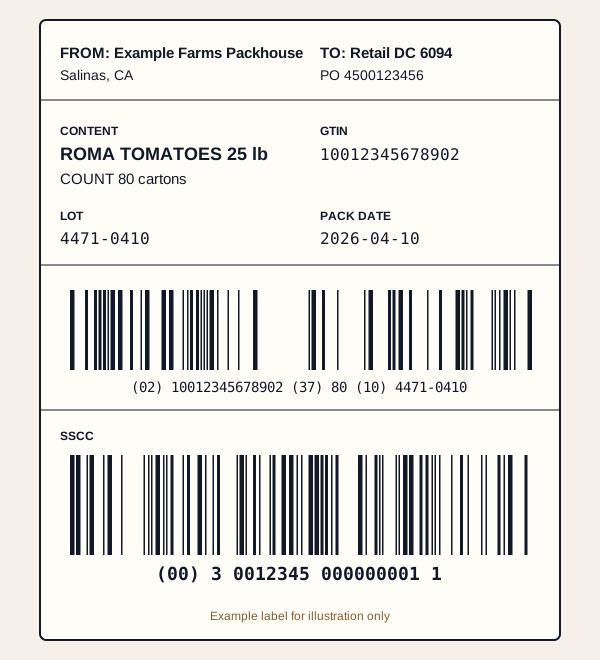
A GS1 logistics label is usually organised in three blocks, from top to bottom:
| Block | Typical content |
|---|---|
| Supplier and carrier block | Ship-from and ship-to details, purchase order number, carrier information if required |
| Customer block | Content of the pallet in human-readable text: product, GTIN of the cases, count, lot, dates |
| Logistics block | Barcodes: content data such as (02) GTIN of contained items, (37) count and (10) lot, and the SSCC with (00) |
The SSCC barcode normally sits at the bottom of the label so it is easiest to scan. Many retailers require the pallet label on at least two adjacent sides of the pallet, at a set height from the floor.
Homogeneous and mixed pallets
A homogeneous pallet contains cases of one product and one lot. The content block can then describe the pallet completely: the GTIN of the cases, the number of cases and the lot. A mixed pallet contains several products or lots. Its content cannot be fully described on the label, so the SSCC becomes the key that links to electronic data, such as an advance shipping notice, listing everything on the pallet.
Fresh produce dispatch often involves both. A packer might send full pallets of a single line to a distribution centre and mixed pallets to food service customers. Producepak tracks what is loaded onto each pallet as orders are picked, so pallet labels and dispatch documents reflect the actual contents.
Retailer label formats
Large retailers build on GS1 standards but add their own requirements: specific label sizes, extra fields, placement rules, barcode symbologies, purchase order references or supplier numbers. Suppliers to several retailers can end up maintaining a different format for each one.
According to the Producepak app guide, built-in label formats include Walmart, Aldi, Tesco, Woolworths, Coles, PickNSave and Loblaw, along with SSCC, GS1 and PTI. For suppliers to those retailers, much of the set-up work is already done.
| Region | Retailer formats listed in the Producepak guide |
|---|---|
| North America | Walmart, Loblaw, PickNSave |
| United Kingdom and Europe | Tesco, Aldi |
| Australia | Woolworths, Coles, Aldi |
Retailers update their supplier requirements from time to time. Always check the current supplier manual or specification from each retailer, and confirm the built-in format matches it before the first delivery.
When your retailer is not listed
For retailers, wholesalers or food service customers without a built-in format, you have two options. Build the format yourself in the label designer, or give the customer's label specification to Pak-Bot and let it generate the format.
Pallet labels in the dispatch workflow
Pallet labels work best when they are produced as part of dispatch rather than as a separate task.
- Pick. Cases are picked to an order, by scanning or by automatic allocation.
- Build the pallet. Producepak records which cases, products and lots are on each pallet.
- Print the pallet label. The SSCC is assigned and the label printed from the pallet record.
- Load and document. Bills of lading and invoices are generated, as listed in the Producepak app guide, with pallet details matching the labels.
- Deliver and confirm. Proof of delivery is recorded against the order.
Because the label, the dispatch documents and the traceability records come from the same data, they agree with each other. That consistency is what distribution centres look for.
Tote and bin labels
Not every label leaves the building. Totes and field bins move between field, cool room and packing line, and labelling them is the first step in traceability. A bin label applied at receival can identify the grower, block, harvest date and receival number. When the bin is tipped onto the packing line, that information links the packed lot back to its source.
The Producepak app guide lists tote and bin labels alongside case and pallet labels. Internal labels are also a good place to use the label designer to suit your own shed, for example large-print grower names that can be read from a forklift.
Chain-Trace QR codes
The Producepak app guide lists Chain-Trace QR codes as part of its shipping and traceability features. A QR code can carry or link to more information than a linear barcode, which makes it useful where buyers, inspectors or consumers want to look up a product's history. Where a customer or market calls for QR codes, they can be added to label formats alongside GS1 barcodes.
Common pallet label failures
| Failure | Consequence | Prevention |
|---|---|---|
| Duplicate SSCC | DC system rejects the second pallet | Let the software assign serial references |
| Label only on one side | Pallet cannot be scanned in the racking | Print two labels and follow placement rules |
| Content does not match ASN or PO | Pallet set aside for checking | Build pallets in the system as they are picked |
| Damaged or wet label | Unreadable barcode | Use suitable label stock for cool rooms; protect labels during wrapping |
| Low print quality | Scan failures | Print at 300 DPI or better and maintain print heads |
Cool room conditions
Produce labels have a hard life. They are printed in a warm office or packing area, applied to cartons that may be damp, then stored at low temperatures and high humidity before travelling in refrigerated trucks. Label stock and adhesives that work in a dry warehouse may peel or smear in a cool room. Choose label materials rated for chilled and damp conditions, and check labels after a day in cold storage when trialling a new supplier of labels.
Asking Pak-Bot about dispatch
Pak-Bot answers questions about orders and inventory, which helps around dispatch and labelling. The Pak-Bot guide's example Walmart orders vs sales Q1 2026 compares what a retailer ordered with what was shipped and invoiced. Short-shipments and label rejections often show up in the same places, so the comparison is a useful check on dispatch performance with each retailer.
Advance shipping notices and pallet labels
Many large retailers expect an advance shipping notice (ASN) before a delivery arrives. The ASN lists each pallet by its SSCC and describes what is on it. When the truck arrives, the distribution centre scans each pallet's SSCC and matches it to the ASN; if the SSCC is unknown or the contents differ, the pallet becomes an exception. The pallet label and the ASN must therefore come from the same data. Building pallets in Producepak as they are picked gives one source for both.
Placing pallet labels
Retailer manuals often specify exactly where pallet labels go. Common requirements include:
- labels on at least two adjacent sides of the pallet;
- a set height range from the floor, so scanners on forklifts and at docks can read them;
- a minimum distance from the vertical edge;
- labels applied outside stretch wrap, or under clear wrap that does not affect scanning.
Add placement instructions to the palletising station's work instructions and check them during internal audits. A correct label in the wrong place can still fail at the dock.
Onboarding a new retailer: label checklist
- Obtain the retailer's current supplier manual and label specification.
- Check whether a built-in format exists in Producepak for that retailer.
- If not, generate the format from the specification with Pak-Bot or build it in the label designer.
- Confirm the supplier number, PO references and any retailer item codes are set up.
- Print case and pallet test labels on production printers and stock.
- Send samples for approval if the retailer requires it.
- Confirm ASN requirements and test the data exchange if used.
- Brief the packing and dispatch teams on placement and checks.
- Check the first delivery's labels in person before loading.
Following the same checklist for every new retailer avoids the most common first-delivery problems.
Pallet labels for food service and wholesale
Not every customer runs a large distribution centre. Food service distributors, wholesalers and market agents may not scan SSCCs at all, but they still need to know what is on a pallet and where it came from. For these customers, a clear pallet card or label showing the customer, order number, product summary and lots is often enough. Printing it from the same pallet record keeps it consistent with the delivery docket and invoice, and the SSCC can still be included for your own tracking even if the customer does not use it.
Measuring pallet label performance
Track how often pallets are queried or rejected at each customer's distribution centre, and why. Many retailers report compliance issues to suppliers through supplier portals or scorecards. Reviewing those reports monthly, alongside your own dispatch records, shows whether label problems are concentrated on one customer, one site, one shift or one printer. Fixing the pattern, rather than individual pallets, is how compliance rates improve over time.
Pallet and retailer label questions
What is an SSCC?
An 18-digit GS1 Serial Shipping Container Code that uniquely identifies a logistic unit such as a pallet, encoded in a GS1-128 barcode with application identifier (00).
Which retailer label formats are built in?
The Producepak app guide lists Walmart, Aldi, Tesco, Woolworths, Coles, PickNSave and Loblaw, as well as SSCC, GS1 and PTI formats.
What if my customer is not in the list?
Create the format in the label designer, or upload the customer's specification to Pak-Bot to generate it.
Can Producepak print tote and bin labels?
Yes. Tote and bin labels are listed alongside case and pallet labels.