
What the Produce Traceability Initiative is
The Produce Traceability Initiative (PTI) is an industry-led programme in North America that set out a common way for fresh produce suppliers to label cases so product can be traced through the supply chain. Rather than every retailer inventing its own system, PTI built on GS1 standards: a Global Trade Item Number (GTIN) to identify the product and a lot number to identify the batch, encoded in a GS1-128 barcode on every case, with matching human-readable text.
PTI case labels have become the expected format for many North American retail and food service buyers. Even where a buyer does not insist on PTI, the same principles of a standard product identifier, a lot code and a scannable barcode underpin most traceability requirements, including the FDA Food Traceability Rule.
This page is a practical summary. For the authoritative requirements, refer to GS1 US and PTI implementation guidance and to each customer's own specification.
Anatomy of a PTI case label
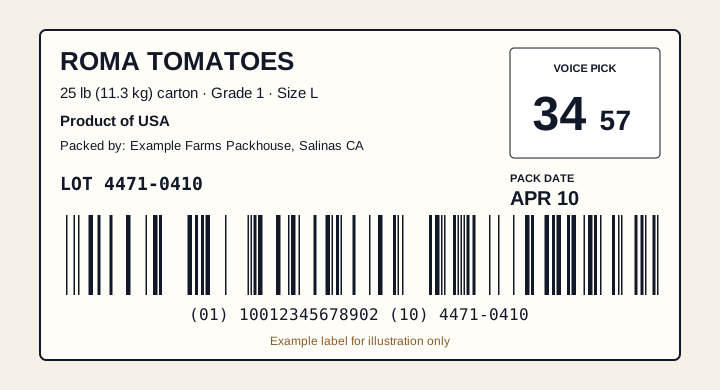
A typical PTI case label carries the following elements.
| Element | What it is | Where it comes from in Producepak |
|---|---|---|
| GS1-128 barcode | Encodes the GTIN with application identifier (01) and the lot with application identifier (10) | Product GTIN and the lot recorded at packing |
| Human-readable GTIN and lot | The same data printed as text under or beside the barcode | Same record as the barcode |
| Commodity and variety | For example ROMA TOMATOES | Product description |
| Pack style | Count, size, weight or pack format, such as 25 lb carton | Product and pack configuration |
| Country of origin | For example Product of USA | Receival and grower records, or product settings |
| Packer or shipper | Name and location, sometimes a logo | Company and site settings |
| Pack date | Often a three-letter month and day, such as APR 10 | Packing date |
| Voice pick code | A four-digit code, shown as two large and two small digits | Calculated from GTIN, lot and pack date |
The GTIN: identifying the product
The GTIN identifies a specific trade item: a particular product in a particular pack. Roma tomatoes in a 25 lb carton and Roma tomatoes in a 10 lb carton are different trade items and need different GTINs. Case-level GTINs for produce are usually 14 digits (GTIN-14) and are built from a company prefix licensed from GS1.
Getting GTINs right
- Obtain a GS1 company prefix if you do not have one.
- Assign one GTIN per distinct product and pack configuration.
- Record each GTIN against the matching product in Producepak so labels pick it up automatically.
- Check that the last digit is a valid GS1 check digit; a wrong check digit means the barcode will be rejected.
The lot number: identifying the batch
The lot number identifies a batch of product that shares a history: typically the same source, the same packing date and often the same packing run. PTI leaves the format of the lot number to the supplier, but it must be consistent and it must be recorded so that the lot can be traced back to its source and forward to its customers.
In Producepak, lots are created and recorded as part of packing, linked to the receivals that went into them. When the case label is generated, the lot comes from that record. This matters more than it might seem: a lot code typed by hand onto a label, even once incorrectly, breaks the link between the carton and its history.
Lots and the FDA Food Traceability Rule
Under FSMA section 204, businesses handling foods on the FDA Food Traceability List must assign traceability lot codes at certain events, including initial packing, and keep linked records. The compliance date is 20 July 2028. A PTI lot code printed from the packing record is a natural fit for a traceability lot code. See printing and compliance for more.
The voice pick code
Many distribution centres pick cases using voice-directed systems: a picker wears a headset, hears instructions and confirms picks by speaking. Reading out a 14-digit GTIN and a lot number would be slow, so PTI labels carry a short voice pick code instead.
The voice pick code is a four-digit number calculated using a CRC-16 algorithm from the GTIN, the lot number and, where used, the pack date. It is printed in a box with the first two digits large and the last two smaller, so pickers can read it at a glance. Because it is calculated rather than chosen, the same inputs always produce the same code, and a mistake in the GTIN or lot produces a different code that the warehouse system will reject.
Calculating voice pick codes by hand is not practical. Producepak calculates them as part of the label, from the same GTIN, lot and date printed elsewhere on the label.
Pack date and other dates
The pack date is commonly printed in a short, human-readable form such as APR 10, and can also be encoded in the barcode where a customer requires it. Some customers ask for additional dates such as a best-before or use-by date. In Producepak, dates come from the packing record and product shelf-life settings rather than being typed onto the label, which removes the most common labelling error of all: an old date left on a new run.
Label size and placement
PTI case labels are commonly printed at sizes such as 2 x 4 inches or 3 x 4 inches, but customers may specify their own. Placement on the case matters too: many buyers expect labels on two adjacent sides of the case or in a specific corner so they can be scanned on a conveyor or in the stack. Check each customer's specification for:
- label dimensions;
- which sides of the case must be labelled;
- distance from edges and corners;
- barcode orientation;
- whether the label can be printed directly on the case or must be an adhesive label.
Printing PTI case labels from Producepak
PTI is one of the built-in label formats in Producepak, listed in the Producepak app guide alongside GS1 and SSCC. The basic steps are:
- Set up products. Record each product's GTIN, description, pack style and country of origin.
- Set up company and site details. Packer name and location come from these records.
- Choose the PTI format. Use the built-in PTI case label, or a customer-specific variant if a customer needs extra fields.
- Pack. When product is packed, the lot and pack date are recorded and the label is generated from them.
- Print and check. Print on a printer of 300 DPI or better and scan the first label of each run.
If a customer's PTI label adds their own elements, such as an item code, a logo or a specific text block, the format can be adapted in the label designer, or generated from their specification by Pak-Bot AI.
Common PTI label problems
| Problem | Typical cause | Prevention |
|---|---|---|
| Barcode will not scan | Low print resolution, worn print head, poor contrast | Print at 300 DPI or higher; maintain printers; scan first label of each run |
| Barcode scans but is rejected | Wrong GTIN or invalid check digit | Validate GTINs when setting up products |
| Voice pick code does not match | Code typed or copied instead of calculated | Let the software calculate it from the label data |
| Wrong pack date | Date edited by hand on a reused file | Take dates from the packing record |
| Lot not traceable | Lot code typed by hand or not recorded | Generate lots at packing and print from the record |
| Label on wrong side of case | Placement not specified to the line | Include placement in run instructions |
Beyond the case: tote, bin and inner labels
Case labels are only one level. Many operations also label field bins and totes on receival, inner packs such as bags and clamshells, and pallets for dispatch. Producepak's built-in formats include tote and bin labels as well as case and pallet labels, so the same data runs through every level: a bin label at receival, a lot at packing, a case label on each carton and an SSCC label on the pallet. See pallet and retailer labels.
Asking Pak-Bot about labelled product
Once cases are labelled from Producepak data, Pak-Bot can answer questions about the product behind the labels. Examples from the Pak-Bot guide include Red onion in poly bags and Total yellow potato in stock. For traceability checks, questions about a lot, such as which customers received it or how much remains in stock, help confirm that the labels and the records tell the same story.
Rolling out PTI labels
For a business moving to PTI case labels for the first time, a simple sequence keeps the change under control.
- Confirm which customers require PTI and whether any add their own elements.
- Get a GS1 company prefix and assign GTINs to each product and pack configuration.
- Decide your lot code format and make sure it is generated at packing.
- Record country of origin against products or receivals.
- Set up the PTI format and test print on each line's printer.
- Scan test labels with a handheld scanner and, if possible, ask a key customer to verify a sample.
- Train the line on placement and on checking the first label of each run.
Working with buyers on PTI
Buyers who require PTI usually ask for sample labels before the first delivery and may audit labels during receiving. Send samples printed on your production printers and label stock, not mock-ups from an office printer, so the buyer sees exactly what will arrive. Keep a record of each buyer's approval. If a buyer reports a problem, a label printed from Producepak data can be traced to its lot and packing record, which makes it quick to find the cause and show that it has been fixed.
PTI beyond North America
PTI was developed for the North American supply chain, but its building blocks, a GS1 GTIN, a lot number and a GS1-128 barcode, are used worldwide. Exporters to North America often need PTI labels on export cartons, and buyers elsewhere increasingly ask for GS1-based case labels with lot information. Setting up products with GTINs and printing lots from the system prepares a business for most of these requirements at once.
For a deeper look at how case labels fit with pallet labels and retailer formats, continue to pallet and retailer labels.
And if a customer adds requirements beyond the PTI standard, upload their specification to Pak-Bot to generate a customer-specific variant.
PTI case label questions
What data is in a PTI barcode?
A PTI case label uses a GS1-128 barcode encoding the GTIN with application identifier (01) and the lot number with application identifier (10); some customers also require a date.
How is the voice pick code calculated?
It is a four-digit code calculated with a CRC-16 algorithm from the GTIN, lot number and, where used, pack date. Producepak calculates it automatically.
Does Producepak include a PTI label format?
Yes. PTI is listed among the built-in label formats in the Producepak app guide, alongside GS1 and SSCC.
What size are PTI case labels?
Common sizes include 2 x 4 inches and 3 x 4 inches, but always follow the customer's specification.