Material on this page draws on the ProducepakQI app guide, the Producepak app guide, the Pak-Bot guide and Producepak and Farmsoft quality control pages listed under Resources below.
Most waste starts as a quality decision
When fresh produce ends up in the bin, the cause is rarely a single event. More often it is a chain of small quality decisions that were missed, delayed or made on poor information. A load with early signs of decay was accepted because the inspector was unsure. A pallet that should have been sold first sat at the back of the cool room because nobody flagged it. A packing run continued for an hour after a grading problem started because the result of the line check was on a clipboard. A retailer rejected a delivery because a pre-shipment check was skipped on a busy morning.
Each of these is a mistake in the quality process, and each turns into waste. AI-powered quality inspection attacks the chain at every link: clearer standards, consistent checks, earlier warnings and faster action.
The common quality mistakes
| Mistake | Typical consequence | How Producepak QI helps |
|---|---|---|
| Inspector unsure what a defect looks like | Inconsistent accept and reject decisions | Reference images and documentation shown during the inspection |
| Measurement outside limits not noticed | Out-of-specification product packed or shipped | Value range tests that require results within set limits |
| Result not shared in time | Product deteriorates while waiting for a decision | Instant alerts with photos to the right people |
| Wrong or old form used | Missing checks | Central inspection programs, updated once for everyone |
| Transcription errors | Wrong results in reports and records | Results captured once, directly in the app |
| Inspection skipped at a control point | Problems reach the customer | Programs for delivery, pre-pack, post-pack and pre-shipment |
| Complaint cannot be traced | Root cause never fixed | Trace complaints to supplier or crop, field or patch |
Show inspectors what "wrong" looks like
Inspector consistency is one of the biggest hidden sources of mistakes. Two experienced people can look at the same carton of stone fruit and disagree on whether a mark is a minor blemish or a rejectable bruise. New or casual inspectors have even less to go on.
Farmsoft's quality control material describes quality officers viewing example fruit defects in the app during the inspection process, and the app presenting images and even links to documentation. When the reference image for "bruising, major" is on screen beside the product, inspectors calibrate against the same standard every time. Retailer specifications and defect guides can be linked to the relevant tests so the inspector never has to remember which page of which manual applies.
Practical tips
- Use your own photographs of real defects from your own product, taken in consistent light.
- Show borderline cases as well as clear ones; that is where disagreements happen.
- Review reference images each season and when retailer specifications change.
Use limits that the app enforces
Producepak QI offers four scoring methods. The value range method requires a result to fall between specific numbers, which turns specifications into checks the app applies every time. Typical uses in fresh produce include:
- pulp or receival temperature within a set range;
- sugar content measured by refractometer on the Brix scale;
- firmness measured by pressure tester;
- pH or acidity for products where it matters;
- pack weight within tolerance.
Farmsoft's quality pages list these physical and chemical measurements, including sugar content, pH and firmness, among the tests used in produce QC. When a result falls outside the range, the inspection reflects it immediately, and the program's alert rules can notify the right people.

Inspect at every control point
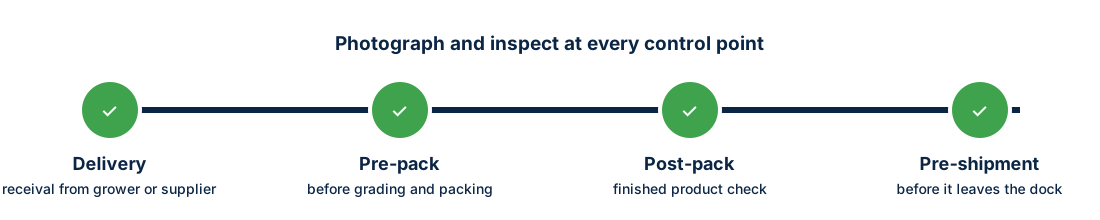
Farmsoft's quality material describes recording photos at delivery, pre-pack, post-packing and pre-shipment. Each control point catches a different kind of mistake.
Delivery
Receival inspection decides whether product is accepted, rejected or downgraded. A strong receival inspection prevents bad product entering the cool room and contaminating stock-rotation decisions. Temperature, maturity, decay and foreign matter are typical checks.
Pre-pack
Checking product again before it goes onto the line catches deterioration in storage and sets expectations for packout. Product that has declined can be routed to a different program or grade before labour is spent on it.
Post-pack
Finished goods checks confirm grading accuracy, pack weight, presentation and labelling. Catching a grading problem in the first hour of a run saves the rest of the run.
Pre-shipment
A final check before loading confirms the product still meets the customer's specification on the day it leaves. This is the last chance to avoid a rejection at the customer's dock.
Alerts that turn findings into action
An inspection result only prevents waste if someone acts on it in time. The ProducepakQI guide describes automatic alerts for each inspection program, which determine which team members or suppliers receive instant quality alerts, with photos and attachments included. Producepak's quality control page describes corrective action alerts sent to the correct team members based on quality criteria.
| Finding | Who might be alerted | Typical action |
|---|---|---|
| Receival temperature out of range | QA manager, receival supervisor | Hold, rapid cooling, supplier notified |
| High decay at receival | Buyer, supplier | Reject or downgrade, claim raised |
| Grading error on the line | Packing manager, line lead | Stop and adjust the grader |
| Pre-shipment failure | Dispatch, sales | Replace product, inform customer |
Design alert rules carefully: too few and problems are missed, too many and people stop reading them. Start with the findings that cost the most when missed.
Stock age and waste
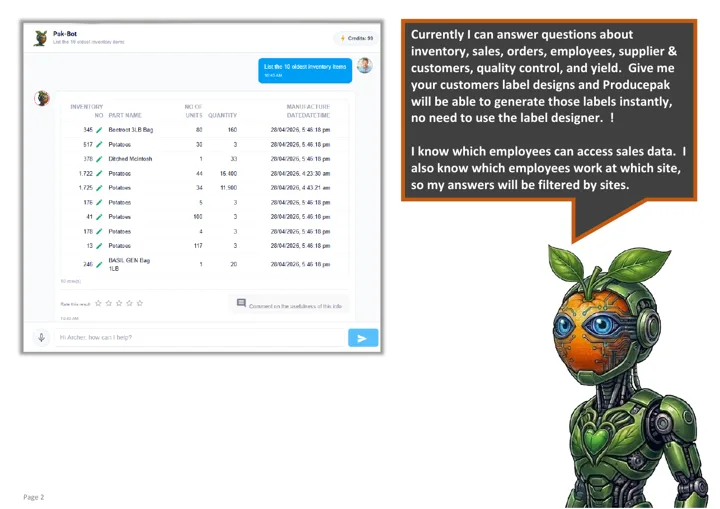
Quality and stock rotation are closely linked. Product that inspected as borderline at receival should usually be sold first. Producepak's inventory features support first-in, first-out tracking and expiry management, and Pak-Bot can list the oldest stock on request. Its guide shows the example List the 10 oldest inventory items. Combining that list with receival inspection results helps the business move at-risk product while it still has value.
Learning from mistakes that did happen
Some problems will still reach customers. The value then lies in finding the root cause. The ProducepakQI guide describes tracing customer complaints back to the supplier, or to the original crop, field or patch, and running instant recalls. With inspections linked to lots, a complaint can be followed back through the post-pack and receival inspections to see where the problem first appeared and whether it was missed or developed later.
A simple root-cause routine
- Record the complaint against the lot and customer.
- Review the post-pack and pre-shipment inspections for that lot.
- Review the receival inspection and supplier history.
- Decide whether the cause was supply, storage, packing or transport.
- Update inspection programs, reference images or alert rules to catch it next time.
Waste you can measure
To know whether mistakes and waste are falling, track a few measures monthly: product written off for quality, receival rejections by supplier, customer rejections and claims, and packout by product. Pak-Bot answers questions about quality control and yield, so many of these can be requested in plain language. Farmsoft's quality control material claims up to a 90 percent reduction in fresh produce waste, auditing and administration costs; your own figures will show what your business achieves.
Mistakes by product type
Different products fail in different ways, so inspection programs should target the mistakes most likely for each.
| Product group | Common quality risks | Useful tests |
|---|---|---|
| Leafy greens and fresh-cut | Wilting, discolouration, decay, temperature abuse | Pulp temperature range, percent decay, appearance score |
| Berries | Mould, bruising, soft fruit | Percent of sample by defect, pass/fail for mould |
| Citrus and grapes | Low sugar, rind or berry defects | Brix value range, defect percentages |
| Avocado and stone fruit | Maturity, firmness, bruising | Firmness range, dry matter or maturity tests, bruising percentage |
| Potatoes and onions | Greening, sprouting, rots, mechanical damage | Defect percentages, pass/fail for rots |
These are typical examples; base your own programs on your specifications and the problems your business actually sees.
Building a no-surprises culture
Technology helps, but waste falls fastest when the whole team expects quality problems to be raised early rather than hidden. Make it normal to record a borderline result and send an alert, even when it creates work. Review alerts at the start of each day. Thank inspectors who catch problems, rather than treating rejections as their fault. When everyone sees that early findings save product and money, the inspection program becomes a tool the whole business relies on.
Mistakes in data, not just in product
Some quality mistakes never touch the product. A result recorded against the wrong supplier, a photo saved to the wrong load, or a test scored on the wrong scale can all lead to wrong decisions later. Recording inspections directly in the app, against the delivery or lot being inspected, removes most of these errors. Flexible data entry, where a new supplier can be added on the spot, prevents the common workaround of recording results against "other" or a similar name. Clean quality data is what makes trend analysis, supplier reviews and AI image recognition reliable.
Checks that catch data mistakes
- Review a sample of inspections each week for missing photos or results.
- Look for suppliers or products recorded under several names and merge them.
- Confirm that each program uses the intended scoring method for each test.
- Ask Pak-Bot simple questions, such as inspections by supplier this week, and check the totals look right.
Waste prevention checklist
- Every receival is inspected with the correct program before product enters the cool room.
- Reference images are available for every defect that drives accept or reject decisions.
- Value ranges are set for temperature, Brix, firmness and pack weight where relevant.
- Alerts go to the people who can act, within minutes.
- Borderline lots are flagged for early sale.
- Pre-shipment checks are done for every key customer.
- Complaints are traced back to inspections and the cause recorded.
Mistakes and waste questions
How does the app help inspectors judge defects consistently?
Reference images and links to documentation can be shown during inspection so inspectors compare product with the same standard.
Can the app enforce specification limits?
Yes. The value range scoring method requires results to fall between set numbers, such as a Brix or temperature range.
Who receives quality alerts?
Each inspection program defines which team members or suppliers receive instant alerts, with photos and attachments.
Can complaints be traced to their source?
Yes. The ProducepakQI guide describes tracing complaints back to the supplier or to the original crop, field or patch.