
Good labels need good printing
A perfectly designed label is worthless if it prints badly. Faded bars, smudged text, labels that peel in the cool room, or printers that stall during a packing run all cause the same outcome as a wrong label: product that cannot be scanned, traced or accepted. This page covers the practical side of printing fresh produce labels with Producepak, then the main compliance rules that labels must meet.
Printing set-ups that work
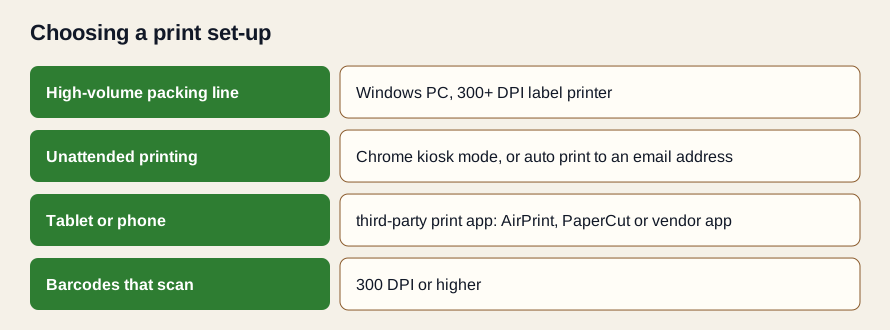
The Producepak app guide gives specific printing advice:
- Resolution: printers of 300 DPI or more are required to print barcodes.
- High-volume printing: Windows devices are recommended, to avoid the delays of cloud print services.
- Unattended printing: Chrome kiosk mode allows printing without user intervention, and auto printing to an email address is supported.
- Android and iOS: printing requires third-party apps such as AirPrint, PaperCut or the printer manufacturer's app.
- Scanning: USB or Bluetooth scanners that paste raw barcode data into the app can be used.
Choosing printers by station
| Station | Typical labels | Recommended set-up |
|---|---|---|
| Packing line | Case labels, retail unit labels | Windows PC with a dedicated thermal label printer at 300 DPI or better |
| Palletising and dispatch | SSCC pallet labels, dispatch documents | Windows PC, label printer sized for pallet labels, document printer nearby |
| Receival | Bin and tote labels | Durable label printer; consider kiosk mode for a dedicated station |
| Office | Test labels, documents | Browser on a PC with access to label and document printers |
| Mobile supervisors | Occasional reprints | Tablet with a print app, or send to a station printer |
Thermal printing and label stock
Most produce case and pallet labels are printed on thermal printers. Direct thermal printing needs no ribbon but can fade with heat and light over time; thermal transfer uses a ribbon and gives more durable print. For produce that spends days in cold storage and refrigerated transport, choose label stock and adhesive rated for chilled, damp conditions, and test a few labels in your own cool room before ordering in volume.
Keeping print quality high
- Clean print heads on the schedule the printer maker recommends.
- Replace worn heads; a single dead element can draw a white line through every barcode.
- Match darkness and speed settings to the label stock.
- Scan the first label of every run with a handheld scanner.
- Keep spare label stock and ribbons at each station.
Asking Pak-Bot to print
Pak-Bot can email and print documents, labels and ad hoc reports on request. On the packing floor this means a supervisor can ask for labels or a printed list without navigating menus. In the office, it means a report can go straight to the printer for a meeting. The Pak-Bot guide's example prompts include Email Angela Coles sales from Q1; print requests work the same way.
Labelling compliance: the main rules
Labelling rules for fresh produce vary by market and by product, and customers often add their own on top. The following summary covers the requirements produce businesses meet most often. It is a guide, not legal advice; always check current regulations and customer specifications for your products and markets.
Traceability lot codes (FSMA 204)
The FDA Food Traceability Rule, from section 204 of the Food Safety Modernization Act, applies to foods on the FDA Food Traceability List, which includes many fresh produce items such as leafy greens, fresh herbs, tomatoes, peppers, cucumbers, melons, sprouts, tropical tree fruits and fresh-cut produce. Businesses must assign traceability lot codes at certain events, including initial packing, and keep records linking those codes through shipping and receiving. The compliance date is 20 July 2028. Printing lot codes on labels directly from the packing record keeps the code on the carton consistent with the traceability record.
Country of origin
Many markets require country of origin information for fresh produce. In the United States, country of origin labeling (COOL) rules administered by the USDA cover fresh and frozen fruits and vegetables sold at retail. Australia has a country of origin food labelling standard. In the European Union, marketing standards require origin information for fresh fruit and vegetables. PTI case labels also carry origin, for example "Product of USA". Record origin against receivals or products in Producepak so it prints correctly when product from different countries is packed.
Price look-up (PLU) codes
PLU stickers on loose fruit and vegetables use codes administered by the International Federation for Produce Standards (IFPS). Conventional produce generally uses a four-digit code; organic produce adds a 9 in front of the conventional code to make five digits. PLU codes are applied to individual items rather than case labels, but retail unit labels and specifications often reference them.
Retail barcodes
Prepacked produce sold at retail usually carries a retail barcode such as EAN-13 or UPC-A, based on a GTIN assigned to that consumer unit. Variable-weight items may use special barcode formats that include weight or price; check your retailer's requirements.
Customer specifications
Retailers and food service customers add requirements on label size, placement, fonts, barcode types, supplier numbers and date formats. These are contractual rather than legal, but failing them has real costs: rejected deliveries, chargebacks and damaged relationships. Keep each customer's current specification on file and link it to the approved format.
| Requirement | Applies to | Where it lives on the label |
|---|---|---|
| Traceability lot code | Foods on the FDA Food Traceability List (US) | Case and pallet labels, often in GS1-128 (10) |
| Country of origin | Many markets and customers | Case labels and retail units |
| GTIN and lot (PTI) | North American retail and food service buyers | Case label barcode and text |
| SSCC | Pallets to distribution centres | Pallet label |
| PLU | Loose produce at retail | Item stickers |
| Customer elements | Each customer's specification | As specified |
Labels in audits and recalls
When auditors or customers test traceability, they often start from a label: pick a carton, read the lot code, and ask the supplier to trace it. That works only if the lot on the label matches the record. Labels printed from Producepak data, combined with Producepak's traceability and recall features, make the trace straightforward. Pak-Bot can then help answer the follow-up questions quickly, such as how much of a product remains in stock or which customer orders were shipped.
Mock recall tip: once a quarter, pick a random case label from the cool room and trace it back to the grower and forward to customers. Time how long it takes. The result tells you whether your labels and records really line up.
A printing and compliance checklist
- Every printer used for barcodes prints at 300 DPI or higher.
- High-volume stations use Windows PCs; unattended stations use kiosk mode or email auto-print.
- Label stock is rated for cold, damp conditions.
- GTINs are valid and recorded against products.
- Lots and dates print from packing records, never typed.
- Country of origin is recorded and prints correctly.
- Each customer's current specification is on file and linked to an approved format.
- First label of every run is scanned and checked.
- A mock recall from a label is run regularly.
Troubleshooting print problems
| Symptom | Likely cause | Fix |
|---|---|---|
| White vertical line through barcodes | Failed print head element | Replace or clean the print head |
| Faded print | Darkness too low, wrong stock or old direct thermal labels | Adjust settings; check stock; consider thermal transfer |
| Labels peel in the cool room | Adhesive not rated for cold or damp | Switch to chilled-rated stock |
| Print starts in the wrong place | Printer not calibrated to the stock | Run the printer's calibration |
| Delays before printing | Printing through a cloud service at high volume | Use a Windows PC at the station, as the Producepak guide recommends |
| Barcode scans on one scanner but not another | Marginal print quality | Increase resolution or contrast; check quiet zones |
Reprints and damaged labels
Labels get damaged: torn during handling, smudged by water, crushed in the stack. A reprint should carry exactly the same data as the original, so print it from the same record rather than retyping. Make reprinting easy at each station, and make it a rule that damaged labels are replaced before product leaves the building. A pallet that arrives with an unreadable label is treated the same as one with no label at all.
Storing label stock
Label stock and ribbons are affected by heat, humidity and dust. Store them in a cool, dry place away from the packing line's wet areas, keep rolls in their packaging until needed, and rotate stock so older rolls are used first. Direct thermal labels in particular can darken if stored near heat sources.
Where to put printers on the packing line
Printer placement affects both speed and accuracy. Put case label printers where the packer or line lead can apply labels without walking away from the line, and away from water spray and wash-down areas. Put pallet label printers at the palletising point, close to where pallets are wrapped, so labels are applied immediately and to the right pallet. Avoid shared printers serving several lines: when two lines print to one printer, labels for different products can end up mixed in the output tray, which is one of the easiest ways to put the wrong label on a case.
Training the people who print
The people who print and apply labels are the last line of defence. A short training session for every new packing line or dispatch worker should cover how to request labels for a run, how to check the first label against the run sheet, where labels go on cases and pallets, how to reprint a damaged label from the system, and who to tell when something looks wrong. A one-page picture guide at each station, showing a correct label and correct placement, is more effective than any written procedure.
Keeping records of labelling checks
Customers and auditors increasingly ask suppliers to show that labelling is controlled, not just that labels are correct on the day of an audit. Simple records help: who approved each label format and when, the first-label check for each run, printer maintenance, and any labelling corrective actions. Producepak's quality inspections can include label checks as part of finished-goods inspection templates, so the evidence sits with the rest of the quality record rather than on loose paper. When a customer queries a label months later, the record shows what was checked and by whom.
Printing and compliance questions
What DPI do I need for produce barcodes?
The Producepak app guide states that 300 DPI or higher is required to print barcodes.
Can labels print automatically without someone pressing print?
Yes. The Producepak guide describes Chrome kiosk mode for printing without user intervention and auto printing to an email address.
Can I print from a phone or tablet?
On Android and iOS, printing requires a third-party app such as AirPrint, PaperCut or the printer maker's app. For high-volume printing, Windows devices are recommended.
What is the FSMA 204 compliance date?
20 July 2028.
How do organic PLU codes differ?
Organic produce generally adds a 9 in front of the four-digit conventional PLU code.