
The packhouse runs on questions
Walk through any fruit or vegetable packhouse for an hour and count the questions. The dispatch lead wants to know whether the finished stock for the first trucks is really there. The packing manager needs to know how much raw product is sitting in bins and totes before setting the day's runs. A salesperson rings through asking what can be promised to a customer. The quality lead wants the morning's inspection failures. The cool room supervisor wonders which pallets have been sitting longest. Each question is simple. Getting each answer usually is not.
Traditionally the answers come from three places: someone walking the cool room, someone scrolling a stock screen, or someone in the office running a report and sending a spreadsheet. All three take people away from their real job, and all three produce answers that are slightly out of date by the time they arrive.
Packhouse AI changes the mechanics. With Pak-Bot inside Producepak, the person who has the question asks it directly, in plain words, on whatever device is at hand, and gets an answer from the live packhouse records.
A day in an AI-assisted packhouse
The diagram below follows one illustrative day. At each point, a short question to the chatbot replaces a walk, a phone call or a report request.
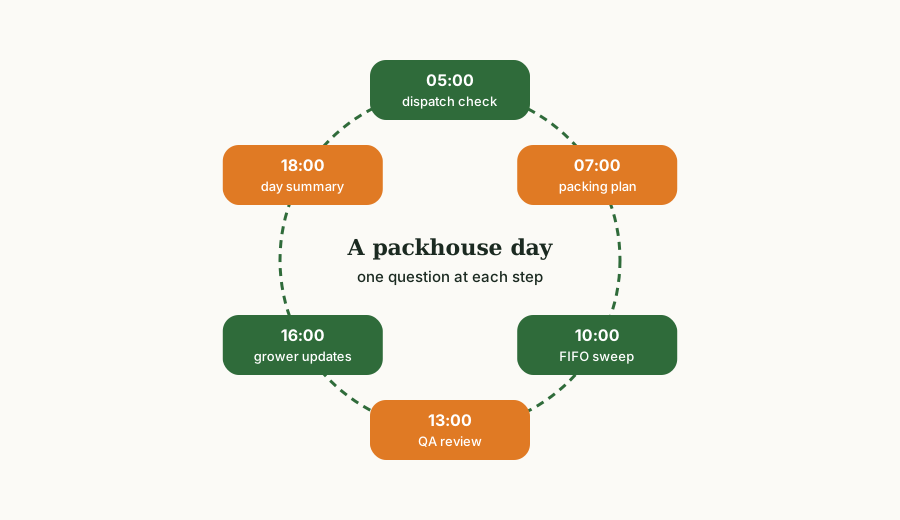
05:00 - dispatch check
Before the first trucks load, the dispatch lead confirms finished stock: Red onion in poly bags. If the figure is lower than the orders need, there is still time to pack more or call the customer, rather than discovering the gap at the loading dock.
07:00 - packing plan
The packing manager checks raw material: Weight of totes in stock, then narrows it: "potatoes in bins by grower". With orders and raw stock in view, the day's runs can be sequenced to use the oldest intake first and meet the earliest dispatch times.
10:00 - FIFO sweep
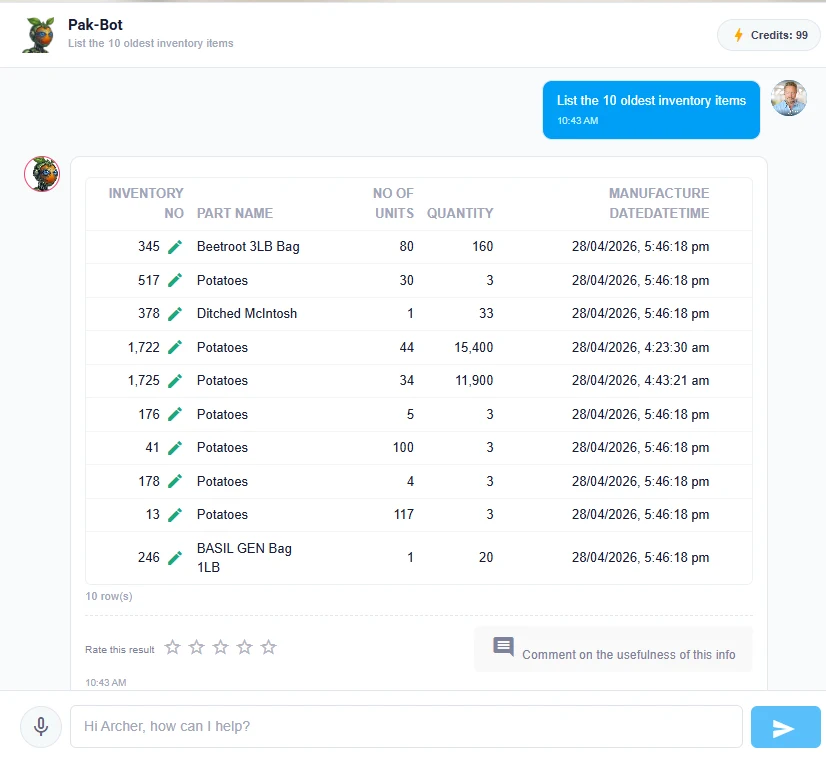
A mid-morning List the 10 oldest inventory items shows exactly which lines have been in store the longest, with manufacture dates. Printed and handed to the forklift driver, it turns first-in, first-out from a policy into a list of pallet numbers.
13:00 - quality review
The QA lead asks for the morning's failed inspections and the most common defects, then charts rejection rate by supplier for the week. Problems with a particular grower's fruit are visible before the afternoon intake arrives.
16:00 - grower updates
The grower liaison checks consigned stock, for example Totals of inventory owned by ACE Farming Group, and emails the result to the grower. More on this in grower reporting.
18:00 - day summary
The operations manager closes the day with a chart of stock weight by site and a glance at packout by line. Tomorrow's priorities are clear before anyone leaves.
Cool room and raw material visibility
The cool room is where packhouse money is made or lost. Product ages, space fills and mistakes hide behind stacked pallets. A chatbot cannot move pallets, but it can make the cool room transparent.
Raw versus finished
Most packhouses hold the same commodity at two stages: raw intake in field bins or totes, and finished goods in retail packs. Asking by packaging separates the two cleanly. "Potatoes in bins" is what the packing line will work through; "potatoes in 2 kg bags" is what dispatch can ship.
Stock by site
Multi-site operators can ask Total of inventory at site Closters or "inventory by site" to decide whether to transfer product. Supervisors linked to one site automatically see that site's stock when they ask general questions, because Pak-Bot knows which site each employee works at.
Age and shelf life
Producepak supports first-in, first-out allocation and expiry tracking. Pak-Bot exposes that information on demand: oldest items, stock older than a set number of days, or product approaching its expiry. For leafy greens, berries and herbs, a daily look at stock age is one of the cheapest waste-reduction habits available.
Packing lines and packout
Packout, the share of intake that leaves as saleable first-grade product, is the number that most directly connects the packing floor to profit. Small differences add up. On a line packing 20 tonnes a day, every percentage point of packout is 200 kg of product moving between first grade and second grade or waste.
Because Producepak records intake and packing outputs against lots, Pak-Bot can report packout by grower, by lot, by line, by variety and by period. Useful packhouse questions include:
- Packout by line yesterday
- First-grade percentage by variety this month
- Lots that packed out below 75 percent this week
- Waste by product last month
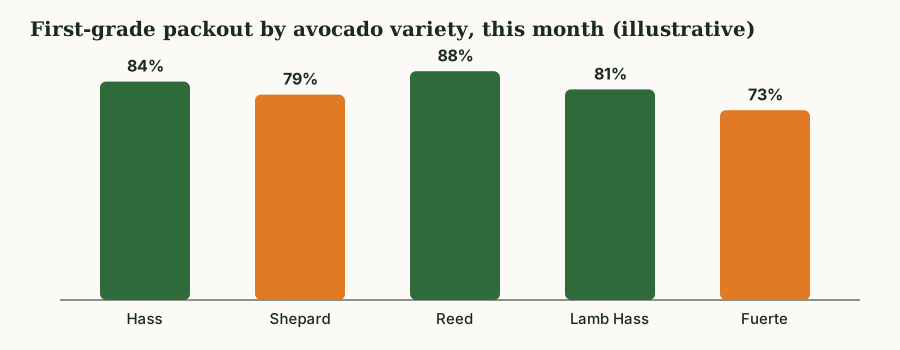
Reading packout differences
When two lines pack the same product at different packout rates, the cause is usually one of a short list: grader calibration, line speed, operator training or equipment wear. When the same line shows lower packout for one grower, the cause is more often in the field or in harvest handling. Asking the question both ways, by line and by grower, points to which conversation to have.
Labels on the packing floor
Retail and food service customers specify their own carton and pallet labels, and an incorrect label can get a delivery rejected. In many packhouses, label changes happen in a label designer that only one or two people understand.
Pak-Bot changes the routine. When a customer's label design has been loaded into Producepak as a template, the packing team can generate that customer's labels on request, with product, lot and date details drawn from the system. The Pak-Bot guide puts it simply: give it your customers' label designs and Producepak can generate those labels instantly, with no need to use the label designer. Details are in order and admin automation.
Hands-free questions
Packhouse staff wear gloves, carry scanners and move constantly. Typing is often impractical. The Pak-Bot message box includes a microphone button, so a supervisor in the cool room can speak "total of inventory at site Closters" and read the answer on a phone or tablet. Producepak runs as a progressive web app, so the same experience works on Android devices, Windows PCs and in a browser.
Device tip: the installed app opens in its own window but does not support multiple tabs at once. Office users who keep several screens open side by side are better served by the browser; single-purpose floor devices suit the installed app.
Who can see what on the floor
Packhouse teams are large and mixed. Not everyone should see customer revenue or grower prices. Pak-Bot knows which employees are allowed to see sales data and filters every answer accordingly. A packing line supervisor can ask about stock, packout and inspections freely; a sales figure will only come back for someone whose role includes sales access. Site assignments work the same way. Because these rules come from Producepak user settings, packhouse managers do not maintain a separate AI permission list.
Packhouse question bank
Copy these and swap in your own products, sites and growers.
| Role | Question | Use |
|---|---|---|
| Dispatch | Orders for delivery tomorrow by customer | Plan loading order |
| Dispatch | Red onion in poly bags | Confirm finished stock |
| Packing manager | Weight of totes in stock | Size today's runs |
| Packing manager | Packout by line yesterday | Spot line problems |
| Cool room | List the 10 oldest inventory items | FIFO picking |
| Cool room | Stock older than 5 days by product | Waste prevention |
| Quality | Inspections that failed this morning | Same-day corrective action |
| Operations | Chart inventory weight by site | Space and transfer planning |
Getting reliable answers in a packhouse
AI answers are a mirror of the records underneath. A few disciplines make the mirror accurate:
- Scan at every movement. Receival, packing, transfer and dispatch scans keep Producepak in step with the physical stock.
- Record all outputs. Second grade, processing grade and waste must be recorded for packout figures to be complete.
- Keep names consistent. Product, packaging and site names that are clear and unique make questions match reliably.
- Stocktake and correct in the system. Fix discrepancies in Producepak, not in a side spreadsheet.
- Rate and comment. When the chatbot misreads a packhouse term, say so in the comment box. The team uses that feedback to train Pak-Bot.
Labour and throughput questions
Labour is often the largest controllable cost in a packhouse. Producepak records which employees are assigned to which site and, depending on how the business uses it, who performed tasks such as order entry or inspections. Pak-Bot can answer questions about employees within the limits of each user's permissions, for example "employees at site Closters" or "inspections completed by each inspector this month".
Throughput questions, such as how much was packed per line per day, help managers see whether staffing matches volume. "Weight packed by line by day last week" shows which days were stretched and which were quiet, which informs rostering for the following week.
Seasonal peaks
At peak season, packhouses run longer hours with more casual staff, and the cost of a wrong decision rises. Peak is also when nobody has time to run reports. That makes a chatbot most valuable at exactly the moment it is hardest to introduce, which is why it is worth bringing in during a quieter period, building the habits, and having them in place when the peak arrives. The adoption guide sets out a plan.
Packing for multiple customers on one line
Many packhouses run the same commodity for several customers on one line, changing pack formats and labels between runs. Each changeover is a chance for error: the wrong carton, the wrong label, the wrong specification. Before a changeover, a supervisor can confirm the next run with the chatbot, for example "orders for Woolworths red onion poly bags tomorrow", and generate that customer's labels from its template. After the run, "weight packed for Woolworths today" confirms the output against the orders. Small checks like these keep changeovers clean on busy days.
Packhouse AI and the wider business
The packhouse does not operate alone. Its output feeds sales, its intake comes from growers, and its records support traceability and grower payments. Because Pak-Bot reads one connected Producepak database, questions asked on the packing floor use the same figures as questions asked by sales or accounts. When the packing manager says first-grade packout was 82 percent on a lot, the grower liaison sees the same 82 percent in the grower update and accounts see it in settlement. That shared view reduces arguments and rework between departments, which in a busy season is worth as much as any time saved on individual questions.
For more on how the rest of the business uses the same data, see AI for distributors and grower reporting.
In short, packhouse AI is less about technology than about removing waiting. Waiting for a report, waiting for someone to check the cool room, waiting for the office to call back. Every wait removed gives the packhouse more time to act on product that will not wait.
Packhouse AI questions answered
Can packhouse staff use the AI without a desk computer?
Yes. Pak-Bot runs inside the Producepak app on phones, tablets and PCs, and accepts spoken questions through the microphone button.
Will line staff see sales or pricing?
Only if their role includes sales access. Pak-Bot applies each user's role and site assignment to every answer.
Can it help with first-in, first-out?
Yes. Ask for the oldest inventory items or stock older than a number of days, and print the list for the floor.
Can it report packout by line or grower?
Yes, provided intake and packing outputs, including lower grades and waste, are recorded in Producepak.
Do we still need the label designer?
Not for customers whose label designs have been loaded as templates. Those labels can be generated on request.