
Why fresh produce labels deserve better software
Every carton, tote, bin and pallet that leaves a produce shed carries a label, and every one of those labels has a job to do. It tells a distribution centre what has arrived. It carries the barcode that a retailer's warehouse system scans. It holds the lot code that links the product back to a grower, a field and a packing run if anything goes wrong. It shows the country of origin a shopper or inspector expects to see. When any of that information is wrong, missing or unreadable, the consequence is immediate: a pallet refused at the dock, a chargeback, a delayed recall trace or a lost program.
Yet in many packhouses, labels are still produced the hard way. Someone opens a label file, edits the date, changes the lot code by hand, checks that the right customer's layout is selected and prints. Multiply that by dozens of products, several customers with different specifications and a fast-moving packing line, and errors are almost guaranteed.
Producepak takes a different approach. Labels are produced from live data: the product, lot, pack date, weight and order already recorded in the system. You choose how each label format is created, and the software fills it in. There are three ways to get a format, and most businesses use all three.
Three ways to create fresh produce labels
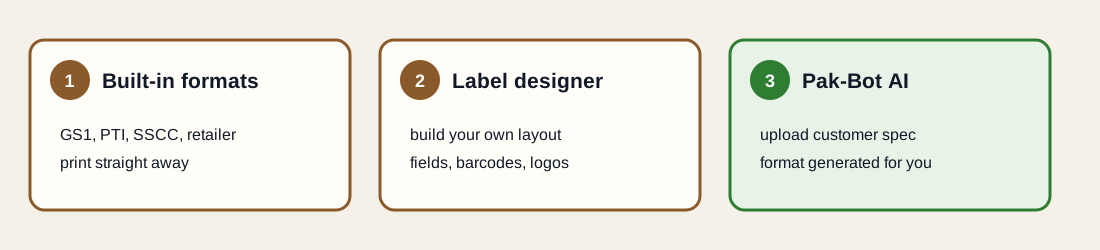
1. Built-in label formats
Producepak includes a comprehensive set of built-in fresh produce and food industry labels. According to the Producepak app guide, these cover SSCC, GS1 and PTI labels and retailer formats for Walmart, Aldi, Tesco, Woolworths, Coles, PickNSave and Loblaw, along with pallet, case, tote and bin labels. For many businesses, a built-in format is all that is needed: select it, connect it to your products and print. See PTI case labels and pallet and retailer labels.
2. Your own formats in the label designer
When a customer, a market or your own brand needs something different, the label designer lets you create new labels and documents at any time. You decide the size, the layout, the text, the barcodes, the logos and which data fields are filled in from Producepak. See the label designer.
3. Formats generated by Pak-Bot AI
Many retailers and food service customers send a label specification: a PDF, a sample label or a photo of what they want. Rather than rebuilding it by hand, you can give that specification to Pak-Bot, the AI built into Producepak. The Pak-Bot guide puts it simply: give it your customers' label designs and Producepak will be able to generate those labels instantly, with no need to use the label designer. See AI label generation.
Which option suits which label
| Situation | Best option | Why |
|---|---|---|
| Standard PTI case label for North American retail | Built-in format | The structure is defined by the industry; no need to reinvent it |
| SSCC pallet label for a distribution centre | Built-in format | GS1 logistics labels follow a standard layout |
| A supported retailer such as Walmart, Tesco or Woolworths | Built-in format | Already set up for that retailer |
| Your own retail brand or market label | Label designer | You control the look and content |
| Internal tote and bin labels | Built-in or designer | Simple layouts, often adapted to your shed |
| A new customer who sends a detailed specification | Pak-Bot AI | Turns the specification into a format without manual design work |
| A customer who changes their specification | Pak-Bot AI or designer | Update the format once; every station prints the new version |
What makes a produce label "right"
A label is right when it is accurate, complete, readable and consistent. Each of those depends on more than layout.
Accurate
The product, lot, date and weight match what is actually in the carton. Producepak fills these from the packing and inventory record, not from typing.
Complete
Every element the customer and the regulations require is present: GTIN, lot, pack date, origin, packer details and any customer-specific fields.
Readable
Barcodes scan first time. The Producepak guide notes that printers of 300 DPI or more are required to print barcodes.
Consistent
Every station and every site prints the same format for the same customer, because formats are stored centrally.
Labels driven by live data
The single biggest improvement most packers see comes from connecting labels to data. When a label format pulls its values from Producepak, a number of common errors simply stop happening:
- Yesterday's date stays on yesterday's labels, because today's labels take today's pack date.
- Wrong lot codes disappear, because the lot comes from the packing record rather than someone's memory.
- Wrong customer layouts become rare, because formats are linked to customers.
- Mismatched barcodes are avoided, because the barcode is generated from the same GTIN and lot as the human-readable text.
The Producepak app guide also lists automatic label generation as part of packing and production, and pallet tracking and Chain-Trace QR codes as part of shipping and traceability. Labels are not a separate step bolted on at the end; they are part of the flow.
Where AI fits in labelling
AI in labelling is not about inventing labels. It is about removing the slow, error-prone work of translating a customer's specification into a working format, and of asking for the right labels at the right time.
Reading specifications
Customer label specifications are written for people. They describe sizes, fonts, element positions, barcode types and mandatory text in prose, tables and example images. Turning that into a working label format usually takes an experienced person an hour or more per customer, and mistakes are easy. Pak-Bot reads the specification and generates the format, which a person then checks against a test print.
Asking for labels
Pak-Bot can email and print documents, labels and reports on request. Once a customer's format exists, the packing team can ask for that customer's labels instead of navigating menus or opening the designer.
Checking labels
Because Pak-Bot can answer questions about orders, inventory and packing, it can also help with the checks around labelling: what is due to be packed for a customer, how much was packed and which lots went into an order.
Who uses label software in a produce business
| Role | What they need from labels |
|---|---|
| Packing line leads | The right customer label for the run, printed quickly, without editing |
| Dispatch | Pallet labels that distribution centres accept first time |
| Quality and food safety | Correct lot codes and dates for traceability and audits |
| Sales and account managers | Confidence that each customer's specification is met |
| Office and administration | New customer formats set up quickly, without design skills |
Getting started
- List your labels. Every customer, every product format, and every label type: case, pallet, tote and bin.
- Match to built-in formats. Use the standard GS1, PTI, SSCC and retailer formats wherever they fit.
- Collect customer specifications. For customers with their own requirements, gather specifications and approved samples.
- Use Pak-Bot or the designer. Generate formats from specifications with Pak-Bot, or build your own in the designer.
- Test print and approve. Print one label per format, scan it, and compare it with the specification.
- Set up printing. Choose printers and printing methods to suit each station. See printing and compliance.
Two documents to keep handy. The Producepak Fresh Produce App PDF lists the built-in label formats, the label designer and the printing options. The Pak-Bot guide PDF explains how Pak-Bot generates customer labels and prints on request. Both are linked on every page of this site.
Labels from receival to delivery
Labels appear at every stage of a produce operation, and each stage depends on the one before.
| Stage | Label | Key data |
|---|---|---|
| Receival | Bin or tote label | Grower, block, harvest date, receival number |
| Packing | Retail unit and case labels | Product, GTIN, lot, pack date, origin, weight |
| Palletising | Pallet label | SSCC, content, count, lot, ship-to |
| Dispatch | Documents | Bill of lading, invoice, delivery docket, export documents |
| Delivery | Proof of delivery | What arrived, when and in what condition |
When each label is printed from the same Producepak records, the chain holds together: the bin label links to the lot, the lot to the case label, the case to the pallet and the pallet to the delivery. That is what makes traceability work in practice, and it is why label software and inventory software belong in the same system.
The real cost of label errors
Label errors rarely appear on a profit and loss statement under their own name, but they cost money in several ways. Deliveries refused at distribution centres mean product travelling back, often losing shelf life on the way. Retailer chargebacks for non-compliant labels reduce the invoice. Staff spend time relabelling pallets in the dock. Traceability exercises take longer when lot codes on cartons do not match records. And repeated problems damage a supplier's standing with the buyer. Measuring your own label-related rejections and chargebacks for a few months is the best way to put a figure on the problem and to see the effect of fixing it.
Moving from an old label system
Many produce businesses run labels from a standalone label program, a folder of label files and a lot of local knowledge. Moving to data-driven labels is easiest in stages: start with one customer or one product line, prove that labels print correctly from Producepak data, then move the next group. Keep the old files available until each format has been approved, then retire them so nobody prints an outdated version by mistake.
Free label printing to get started
Farmsoft offers free fresh produce label printing with the free edition of Producepak, including GS1, PTI, SSCC, voice pick and retailer formats. It is a straightforward way to try data-driven labels before moving the whole operation across. When you are ready for customer-specific formats, the label designer and Pak-Bot AI label generation build on the same foundation.
Where to go next
If you supply North American retail, start with PTI case labels. If distribution centres are rejecting pallets, read pallet and retailer labels. If you need your own formats, see the label designer. If customer specifications are your bottleneck, go straight to AI label generation. And for printers, barcode quality and labelling rules, see printing and compliance.
Fresh produce labels and AI: questions
Which label standards does Producepak support?
The Producepak app guide lists SSCC, GS1 and PTI labels, retailer formats for Walmart, Aldi, Tesco, Woolworths, Coles, PickNSave and Loblaw, and pallet, case, tote and bin labels.
Can I design my own label formats?
Yes. The label designer lets you create new labels and documents at any time.
How does AI help with labels?
Give Pak-Bot a customer's label specification and Producepak can generate that customer's labels instantly, without using the label designer.
What printer resolution do I need?
The Producepak guide states that 300 DPI or higher is required to print barcodes.
Is there a free way to try label printing?
Farmsoft offers free fresh produce label printing with the free edition of Producepak; see the related link in the footer.