Set up once, use safely every day
Using AI well starts before the first question. A few settings decide what every user sees, on which device, and how quickly Pak-Bot learns your business's language. Getting them right takes an administrator an hour or two and prevents nearly every early problem: people seeing data they should not, people missing data they need, and answers that miss because names are unclear.
1. Choose the right server
Pak-Bot runs inside the new Producepak app. Users sign in at the address for their region:
| Region | Address |
|---|---|
| USA, Europe, Africa | https://app3.producepak.com |
| Australia, New Zealand, Asia | https://sydney3.producepak.com |
Using the right server gives the best response times. If you are not sure which server your business is on, contact Producepak.
2. Decide: installed app or browser
Producepak is a progressive web app. On Android and Windows, choose "Install app" to give it its own icon and window. There is one trade-off: the installed app does not allow multiple tabs at the same time. If someone needs several screens open together, such as an order in one tab and Pak-Bot in another, they should use the browser and not install the app.
| User | Recommendation |
|---|---|
| Office staff switching between screens | Browser |
| Supervisors on tablets | Installed app |
| Sales staff on phones | Installed app |
| Shared floor devices | Installed app, individual sign-in |
3. Set roles: who can see sales data
According to the Pak-Bot guide, Pak-Bot knows which employees can access sales data. That rule comes from each user's Producepak role. Review it before rollout:
- List everyone with sales access and confirm each person needs it.
- Remember that email and print follow the same rule: a user who cannot see sales data cannot email it either.
- Rewording a question does not get around the rule, because the restriction applies to the data, not the words.
4. Set sites: who works where
Pak-Bot also knows which employees work at which site, and filters answers by site. A supervisor at one packhouse asking for "total inventory" sees that packhouse. A manager assigned to several sites sees all of them. Check that every user is assigned to the right sites, especially people who move between locations.
5. Tidy the names Pak-Bot matches
Pak-Bot matches the words in questions to names in Producepak. Clear names make questions work first time.
Pay particular attention to products (commodity, size, pack format), pack formats (one name each), customers (no duplicates), sites and inventory owners.
6. Load customer label designs
If you want packing staff to generate customer labels from Pak-Bot, send Producepak each customer's label specification or an approved sample, with label size, printer and the products concerned. Start with your largest or strictest customers. See orders and labels.
7. Teach the team to give feedback
Every Pak-Bot answer has a five-star rating and a "comment on the usefulness of this info" box. Pak-Bot's introduction says it is still learning and that the team uses feedback to train it. Ask users to:
- rate every answer they use, good or bad;
- say what they expected when an answer misses, for example "Closters is a site, not a customer";
- mention nicknames and shorthand the business uses.
Data safety: what stays where
The Pak-Bot guide states that your data, excluding prompts, is not sent to ChatGPT and always stays on Producepak servers. In practice:
- Your records (stock, sales, orders, quality, growers, employees) are queried inside Producepak.
- Your prompt wording is used to understand the question.
- Figures in answers come from your database, not from the AI model's general knowledge.
Safe prompting rules for staff
- Ask the question; do not paste data into it. Pak-Bot already has the records.
- Never include passwords, bank details or confidential contract text.
- Check anything going outside the business on screen before emailing it.
- Confirm figures for financial statements against standard reports or the accounting system.
Credits
The Pak-Bot window shows a credits counter in the top corner, which tracks usage. If your team uses Pak-Bot heavily, check the counter from time to time and contact Producepak about allowances for your account.
Moving from Farmsoft
Businesses on Farmsoft can keep using it until 2028. Pak-Bot is part of Producepak, so setting it up means setting up the relevant users in Producepak. A common approach is to start with a small pilot group in Producepak while planning the wider move, ideally outside the peak season.
A rollout plan that works
Pilot (two weeks)
Pick four to six people from different roles: sales, warehouse, quality, office and a manager. Ask each to use Pak-Bot for real work every day, rate every answer, and note the questions that work best. Start with questions whose answers they already know.
Train (one week)
Turn the pilot's best questions into a short list for each role, using your own names. Run a 30-minute session for each team.
| Minutes | Content |
|---|---|
| 0-5 | Show three questions relevant to the team |
| 5-15 | Everyone asks three questions about their own work |
| 15-20 | Follow-ups, charts, email and print |
| 20-25 | What each role can and cannot see; safe prompting |
| 25-30 | Rating and commenting; hand out the role list and the Pak-Bot PDF guide |
Expand (ongoing)
Add users team by team. Add label templates and purchase order capture once question-asking is a habit.
Name a champion
One person should own Pak-Bot adoption: collecting good questions, helping colleagues, checking that feedback is being given and passing broader observations to Producepak. Without an owner, early enthusiasm tends to fade. The champion does not need to be technical; they need to know the operation and the people.
Shared devices
Packing floors often use shared tablets or PCs. Because Pak-Bot filters by the signed-in user, shared logins make permissions meaningless. Where possible, give everyone their own login and make signing out at the end of a shift part of the routine. If a shared account is unavoidable, give it only the access the floor genuinely needs, and no sales access.
Leavers and role changes
Disable accounts on the day someone leaves, and update roles and sites when people change jobs or move between locations. Pak-Bot follows the settings automatically, so keeping them current is the whole job.
A one-page AI policy
Many businesses now want a short written rule on AI tools. A practical version:
- Questions about our stock, sales, orders, quality and growers go to Pak-Bot inside Producepak.
- Do not paste customer, grower, pricing, employee or financial data into public AI tools.
- Never put passwords, bank details or contract text in any prompt.
- Check anything going outside the business before it is sent.
- Confirm figures for financial statements against standard reports or the accounting system.
- Rate Pak-Bot answers and comment when something is wrong.
Monthly administrator review
- Check the list of users with sales access.
- Check site assignments for anyone who moved.
- Disable any leavers missed during the month.
- Review new products, customers and sites for clear names.
- Ask the champion which questions still misfire and make sure they have been reported.
- Glance at the credits counter.
Ten minutes a month keeps Pak-Bot accurate and safe as the business changes.
What users see, by setting
This table shows how role and site settings combine. It is an illustration; your actual roles depend on how users are set up in Producepak.
| User | Sales access | Sites | Asks | Gets |
|---|---|---|---|---|
| Cool room supervisor | No | Closters | Total yellow potato in stock | Yellow potato stock at Closters |
| Cool room supervisor | No | Closters | Total sales last month | No sales figures |
| Sales manager | Yes | All | Sales by state last month | Sales by state, whole business |
| Regional manager | Yes | Two sites | Total yellow potato in stock | Stock at both assigned sites |
Test a few of these combinations during the pilot. Ask a user without sales access to try a sales question, and a single-site user to ask for total inventory, to confirm the settings behave as you expect.
Preparing for questions from staff
When AI arrives, staff often ask the same few things. Have answers ready.
- "Is it watching what I do?" Pak-Bot answers questions from business records according to each user's access. Ratings and comments are used to improve its answers.
- "Will it replace my job?" It takes over repetitive lookups and keying so people can spend more time on work that needs judgement and experience.
- "What if it gets something wrong?" Check the table, rephrase with exact names and dates, and rate the answer with a comment.
- "Can I use it on my phone?" Yes, through the Producepak app, with the same permissions as on a desktop.
Keeping the guide handy
Print the three-page Pak-Bot PDF guide and pin it near shared devices, in the office and in the lunch room. It shows the sign-in addresses, what Pak-Bot can answer, the security rules and ten example questions. New staff can get started from it in minutes, and existing staff use it as a reminder of what to ask.
Setting up for multiple sites
Businesses with several packhouses, cool stores or warehouses need a little extra care. Decide who should see each site's data: usually site staff see their own site, regional managers see their region, and senior managers see everything. Set site assignments to match, then test them with a simple question such as Total of inventory at site Closters from users at different sites. Make sure site names are distinct and match how people talk about them, so "site Closters" is never confused with a customer or grower of a similar name.
Where staff work across sites, for example a quality manager who visits several packhouses, assign them to every site they need. Review these assignments whenever someone's responsibilities change.
Security in plain words
Three sentences sum up Pak-Bot's approach to data safety, and they are worth repeating to every user. Pak-Bot shows you only what your role and site allow. Your business data stays on Producepak servers and is not sent to ChatGPT. The words you type are used to understand your question, so keep anything confidential out of them.
Checklist summary
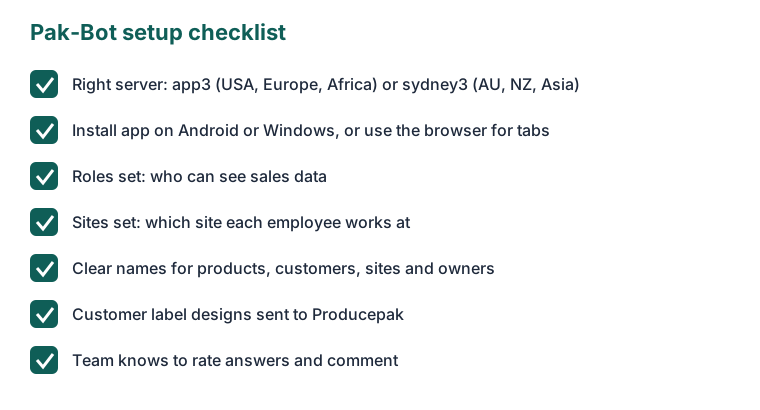
Before the first user asks a question, confirm that everyone knows their server address; that each device is set up as an installed app or browser to suit how it is used; that sales access and site assignments are correct; that product, customer, site and owner names are clear; that label designs for key customers are with Producepak; and that every user knows to rate answers. With those in place, the rest of this guide can be handed to the team with confidence.
Setup questions
Do I need to configure separate permissions for Pak-Bot?
No. Pak-Bot uses the roles and site assignments already set in Producepak.
Is my data sent to ChatGPT?
No. According to the Pak-Bot guide, data excluding prompts is not sent to ChatGPT and stays on Producepak servers.
Why can I not open a second tab?
The installed app does not allow multiple tabs. Use Producepak in the browser if you need them.
Which server should I use?
app3.producepak.com for the USA, Europe and Africa; sydney3.producepak.com for Australia, New Zealand and Asia.